CSA AutoLISP Routines
Important notice: The CSA web site was re-designed in August of 2010. Some documents then available were considered complete and static; so they were not included in the re-design and were not updated. This is one of those documents. Information about dates of posting and revision remains here, but there will be no revision of any kind after August, 2010.
The following routines are included in the CSA acad.lsp file that may be downloaded. You may download the text version of the file you are reading by clicking here and the plain text version of the acad.lsp file by clicking here. (The files are compressed as .zip files, named csalexp.zip and csalisp.zip; the unzipped files will be lispexpl.txt and acad.lsp.) Please note that the illustrations included here will not be included in the downloaded files.
lyfz - a routine to freeze layers selected by the user - The user selects objects on the screen, and the layers those objects are on are frozen. Invoke the command, pick entities from the layers you want frozen, return when finished.
lys - a routine to select the current layer from the screen without worrying with its name - The user selects an object on the screen, and the layer on which it exists is made the current layer.
bgfac - a routine to make a large polygonal surface - The user gives the points which define the vertices of the polygon. The polygonal surface is actually made of a number of triangular surfaces.
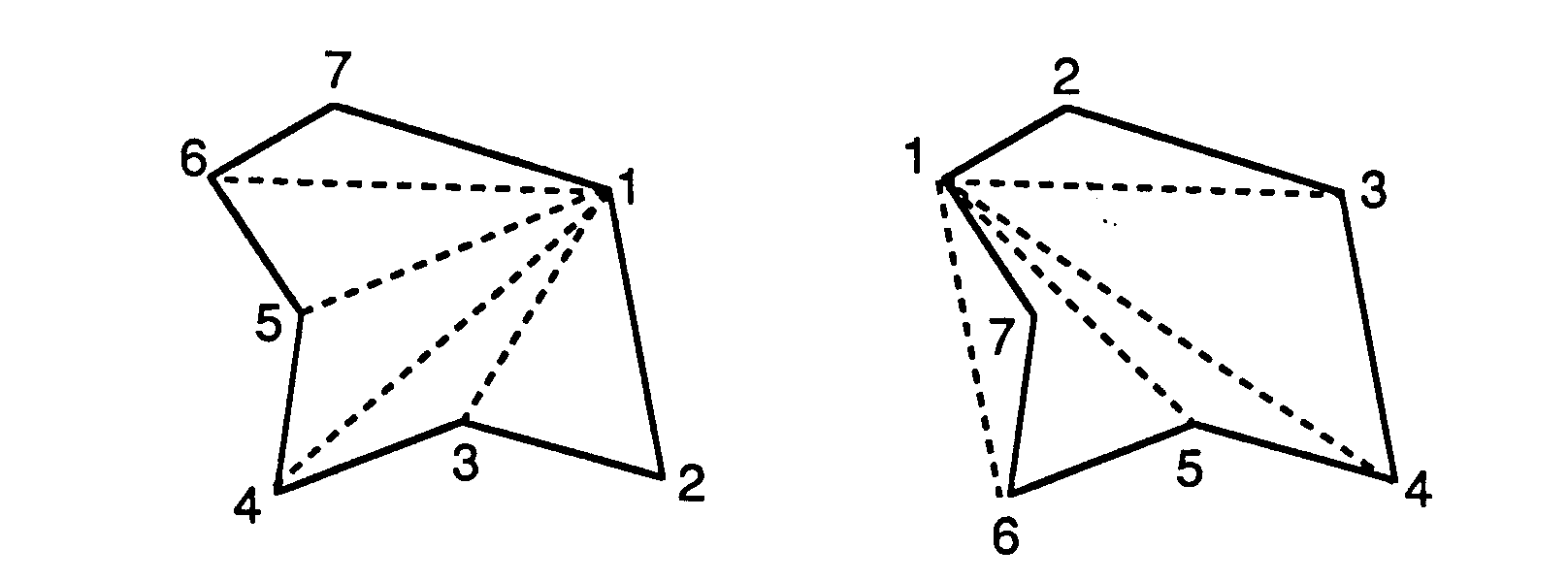
Fig. 1 - Two polygonal surfaces made with the bgfac command.
To the left is a sample surface (the solid lines), with the dashed lines showing the triangles constructed in the process of making what will appear to be a single polygonal surface - the combined triangles 1,2,3; 1,3,4; 1,4,5; 1,5,6; and 1,6,7. (Using AutoCAD's ability to make surface edges invisible, the routine makes visible only the edges that define the boundary of the polygon; however, any of the triangular surfaces can be modified so that interior divisions will be visible.) If one begins at the upper left instead of the upper tight ,(s shown in the figure on the right, AutoCAD will construct a figure which appears to be correctly entered, but there will be a triangular surface, with corners at points 1, 6, and 7, lying completely outside the intended polygon. Although the edge (dashed line 1-6) will not show, the surface will be there, and it will hide anything behind it in a hidden line drawing. (The area of triangle 1,6, 7 will also fall within the triangle 1, 5, 6; so both triangles are problematic.)
ctfac - similar to bgfac, but with a center point from which all triangular surfaces radiate - The user selects the center point first and then the vertices of the overal polygonal surface. Triangles are constructed using the center point and each adjacent pair of edge points. Using this can make the problem illustrated in Fig. 1 easier to deal with; this routine also makes it possible to have the center of the polygonal surface protrude or recess. (The edges of the facets produced with this routine may be hidden or not, as the user prefers.)
mpface - similar to bgfac, but using an existing polyline to define the points of the polygonal surface. The same concern about the order in which points are selected applies.
plfacet - similar to ctfac, but using an existing polyline
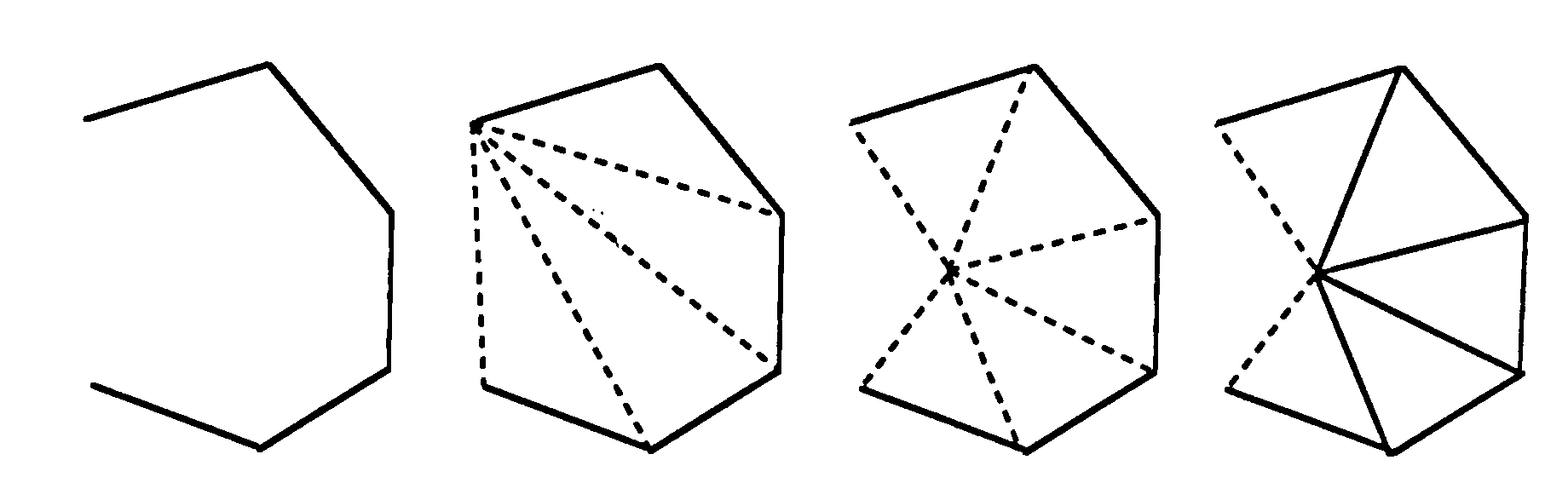
Fig. 2 - Using mpface and plfacet with open polylines
When used with a closed polyline, this routine acts just like bgfac. When used with open polylines, as in the polygon on the left in Fig. 2, the figure is not closed.
However, it is surfaced as if it were. The only difference between this polygon and one made with a closed polyline is that this polygon has one invisible edge (between the starting point and the last point selected). The next polygon shows, with broken lines, the surfaces drawn by the mpface routine. The next figures show the surfaces that would be drawn using plfacet, first with the lines showing interior edges made invisible and second with those lines made visible. (The choice - visible or invisible interior lines - is user-selected at the beginning of the routine.) Open polylines, used together, may make it possible to construct larger polygonal surfaces using fewer AutoCAD commands.
dblface - make surfaces between two polylines. The surfaces are quadrilateral surfaces connecting points on the first polyline with points on the second one. The points are selected from each line, starting at the beginning of each line; so the surfaces will connect the first and second points of line A with the first and second points of line B, the second and third points of line A with the second and third points of line B, and so on.
getvrtx.lsp - a routine called by some of the others. It should not be deleted from the file, but it will only be called by other routines.
About this document:
- Title: CSA AutoLISP Routines
- File name: csalisp.html
- Author: Harrison Eiteljorg, II, c/o Center for the Study of Architecture (CSA), Box 60, Bryn Mawr, PA 19010 (email: user-name nicke at (@) domain-name csanet.org; tel.: 484.612.5862)
- Revision history: This document has been updated, and further changes may occur; there will be no archiving of past versions. Last updated, August, 1996. Cosmetic revision: December, 2005; March, 2010; and August, 2010.
- Internet access: This document is maintained at csanet.org by the Center for the Study of Architecture and Harrison Eiteljorg, II. Note that there may be changes in computer addresses that are beyond the control of CSA.
- Long-term availability: This document or its successors will be maintained for electronic access for the foreseeable future. Prior versions will not be archived.
- Citation permissions and copyright information: This document is copyrighted by the Center for the Study of Architecture. Citations should include the date the document was accessed.


